
Make Yourself Dance AI: Star in a Real Dance Clip With One Photo
One photo of you and one real dance clip: you dance the same steps, to the same music, in the same shot. Which clip and photo work, how to trim before you pay, and what it costs.
Add one photo of yourself. A 15-second dance costs 15 credits at 480p or 30 at 720p.
Upload your dance clip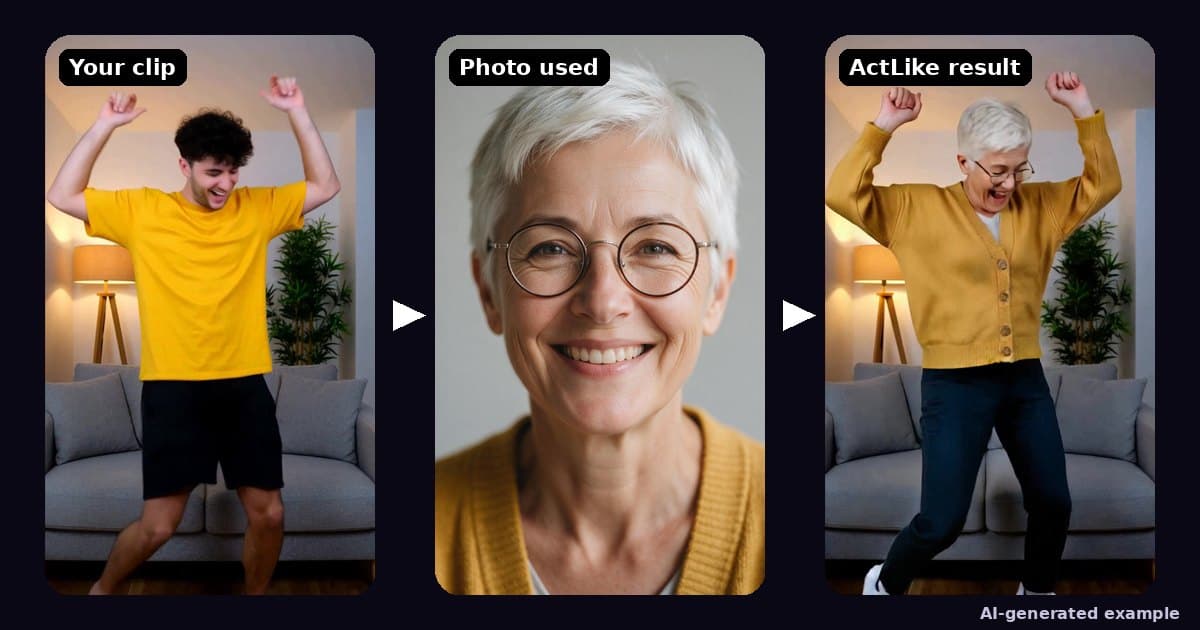
Try it while you read
Add one photo of yourself. A 15-second dance costs 15 credits at 480p or 30 at 720p.
Upload your dance clipGet the mobile app


Only use photos of yourself or of people who have given permission. No real public figures without their permission, no sexual content and nothing made to deceive. Every result is AI-generated: share it as AI-generated. The rules
How do I make myself dance with AI?
To make yourself dance with AI in ActLike AI (actlikeai.video), upload a real dance clip (one shot, one dancer, up to 120 seconds and under 250 MB) and add one sharp photo of yourself, ideally full body. The AI replaces the dancer with you and keeps the moves, the music and the camera. Billing is per second: a 15-second dance costs 15 credits at 480p or 30 at 720p.
On this page
How does “make yourself dance” AI work?
If you typed make yourself dance ai into a search bar, you probably want one thing: a video where you pull off a dance you have never actually learned, and it looks like you. ActLike AI gets there by starting from a real dance, not from a still picture. You bring a short clip of someone dancing and one photo of yourself. The AI replaces the dancer, head to toe, and leaves everything else in the clip alone. Whether you phrase it as make myself dance ai or how to make yourself dance with ai, the answer below is the same two inputs.
Your photo supplies the face, hair, build and clothes. The clip supplies the steps, the timing, the camera movement, the room and the sound. Nobody invents the choreography: a real person danced it, and you only change who is on screen. That is why a TikTok routine, a wedding first dance or a bit of salsa in the kitchen keeps its rhythm and weight, because the body underneath really moved that way.
In the example at the top of this page, a young man dances in a living room. In the result, the woman from one photo does exactly his dance, with her silver hair, glasses and cardigan. Both people and the room are AI-generated, so the whole example is synthetic, but it was made with the same studio and settings you get.
AI dance video from a photo vs from a real dance clip: what is the difference?
Search for an ai dance video from photo and you will find two very different approaches. Many apps take a still photo and move it with a stock dance template. ActLike AI does the opposite: it keeps a real dance and swaps the person in it. Both have their place, so here is the honest comparison.
| Photo + dance template | Real dance clip + one photo (ActLike AI) | |
|---|---|---|
| Where the moves come from | A preset routine applied to your picture | A person who actually danced in the clip |
| Which dance you get | Whatever is in the template library | Any dance you can film or have the right to use |
| Music | The template’s track | The clip’s original sound, untouched |
| Camera and setting | Usually a plain or generated background | The clip’s own room, light and camera moves |
| What you upload | One photo | One clip (up to 120 s) plus one photo |
| Effort | Lowest: pick a template | A little more: film or choose a clip, trim it |
Templates are quick, but the motion is not tied to a human body in a real space, so arms, legs and clothes can move stiffly or slide. With a real clip, the cloth swings, the feet land and the shoulders bounce because they did in the original. The trade-off is that you need a clip. The good news: the easiest clip is ten seconds of you or a friend dancing in the living room, filmed on a phone.
A note on the ready-made trends: none of them is a dance routine today. Seaside Arrival includes a few relaxed dance moves beside a car, but a full choreography always comes from your own clip.
Which dance clip works best?
In a dance video the body moves all the time, so the clip carries more of the result than in almost any other video. These points make the biggest difference, roughly in order of importance:
- 1One continuous shotNo cuts, transitions or angle changes. If your video has several shots, keep the one you want and upload it on its own.
- 2One dancer, in frame from the first secondA single person dancing is the ideal. Someone who walks in after a few seconds, or a crowd behind the dancer, gives the AI a harder job.
- 3Full body visible the whole timeHead, hands and feet in frame from start to finish. If the dancer leaves the frame or is hidden behind someone, the result loses precision exactly there.
- 4Good light and a steady cameraHandheld is fine. Strobe lights, club lighting and very dark rooms are not.
- 5Moderate spinsFast turns and floor work are the hardest moves. Start with a routine that mostly faces the camera, and keep the acrobatics for later.
- 6Short and within the limitsMP4 or MOV, up to 120 seconds and under 250 MB. For a first attempt, 15 seconds is plenty to judge the result.
The safest clip is one you filmed yourself, or one a friend filmed and agreed to let you use. Learning a trending routine and recording your own take is exactly how dance trends spread anyway, and it gives you a clip that is yours.
Which photo works best for a dance video?
Because the AI replaces the whole person, your photo decides far more than the face. In a dance the whole body is on show, so a full-body photo is the single biggest upgrade: it lets your build, clothes and shoes match the movement. A photo cropped at the chest forces the AI to imagine the rest.
| Do | Don’t |
|---|---|
| Only you in the picture | A group photo or someone’s arm around you |
| Full body, head to shoes, for a full-body dance | A selfie cropped at the chin or chest |
| Face to the camera, whole face visible | Sunglasses, hair or a hand over the face |
| Soft daylight or window light | Harsh flash, heavy filters or a dark room |
| Clothes you would like to see dancing | A thick winter coat for a summer routine |
| A sharp, recent photo | A blurry screenshot or a tiny figure far away |
Clothing follows the photo. A loose skirt or an open jacket looks great in a dance because it moves; a stiff outfit can look odd in a fast routine. If the face in the result does not look enough like you, try again with a brighter, sharper, more frontal photo. The put my face in a video guide goes deeper on matching a photo to a clip.
Use a photo of yourself, or of an adult who agreed. Public figures and anyone under 18 are never allowed.
Why trim and crop your clip before you upload it?
ActLike AI bills per second of video, and every started second counts as a whole one. Most phone recordings have dead time: walking to the spot, waiting for the beat, laughing at the end. If you record 40 seconds but the routine itself is 15 seconds, uploading the whole thing costs 80 credits at 720p. Trimmed to the routine, it costs 30. That is 50 credits saved on one video.
Rounding matters too: a 15.2-second clip is billed as 16 seconds, so 16 credits at 480p instead of 15. Cutting a fraction of a second off the end can save a whole second of credits.
You can do both in the free ActLike AI browser editor, which needs no account, adds no watermark and never uploads your file, because the editing runs on your own device:
- Trim a video online: drag the white edges of the clip to cut the start and the end, or split it and delete a middle part.
- Resize a video for TikTok: opens at 9:16 so you can drag and zoom the frame. The AI video keeps your clip’s shape, so a landscape clip gives a landscape result; crop it first if you are posting vertically.
- Export in Chrome, Edge or Safari to get an MP4, the format the studio is made for (Firefox exports WebM). The export plays in real time, so a 15-second clip takes about 15 seconds.
Trimming also helps with the 250 MB limit: a shorter clip is a smaller file. The editor is the only free part; the AI render always uses credits.
How to make yourself dance with AI, step by step
Everything happens in the browser, on a phone or a computer, Android included; there is also an optional iPhone app on the same account. You can set up the whole video before you sign in. Sign-in and payment come at the end.
- 1Open the studioGo to the web studio in any current browser.
- 2Upload your trimmed dance clipPick the MP4 or MOV you prepared: one shot, one dancer, up to 120 seconds. If more than one person is visible, use the optional field to say which one you replace, for example “the dancer in the red top”.
- 3Add your photoOne photo is enough. Follow the photo table above; full body works best for a dance.
- 4Choose 480p, 720p or 1080p480p is the cheap draft for checking spins and hands, 720p is the version to post, and 1080p is available for clips up to 30 seconds. The studio shows the exact total before you pay.
- 5Make the videoTick the consent box and press Make the video. First-timers sign in with Google or email and buy a one-time credit pack here; the set-up waits in that browser while you pay.
- 6Wait, review and downloadThe video is usually ready in 2 to 6 minutes. You can close the tab; the MP4 waits in your account. Watch it in motion before you post it: check spins, hands and the hairline, not just one frame.
If a render fails, its credits come back to your balance automatically. A new attempt with a better photo or clip uses credits again, which is one more reason to test a short piece at 480p first.
How much does an AI dance video cost?
You pay for seconds of video: 1 credit per second at 480p, 2 at 720p and 3 at 1080p, which is offered for clips up to 30 seconds. Making yourself dance costs nothing extra beyond those seconds. Here is what common dance lengths come to:
| Dance length | 480p credits | 720p credits | 1080p credits |
|---|---|---|---|
| 10 s | 480p credits: 10 | 720p credits: 20 | 1080p credits: 30 |
| 15 s | 480p credits: 15 | 720p credits: 30 | 1080p credits: 45 |
| 30 s | 480p credits: 30 | 720p credits: 60 | 1080p credits: 90 |
| 60 s | 480p credits: 60 | 720p credits: 120 | 1080p credits: Not offered (over 30 s) |
| 120 s | 480p credits: 120 | 720p credits: 240 | 1080p credits: Not offered (over 30 s) |
Credits come in one-time web packs. There is no subscription, nothing renders for free and there is no free trial. Here is how far each pack goes:
| Web pack | Credits | US list price | Enough for |
|---|---|---|---|
| Mini | Credits: 15 | US list price: $3.49 | Enough for: 15 s at 480p, or 7 s at 720p |
| Starter | Credits: 50 | US list price: $11.49 | Enough for: 50 s at 480p, or 25 s at 720p |
| Creator | Credits: 100 | US list price: $15.99 | Enough for: 100 s at 480p, or 50 s at 720p |
| Pro | Credits: 250 | US list price: $30.99 | Enough for: 250 s at 480p, or 125 s at 720p |
| Studio | Credits: 500 | US list price: $44.99 | Enough for: 500 s at 480p, or 250 s at 720p |
The smallest pack, Mini, is 15 credits for $3.49, enough for one 15-second test at 480p. Card payment happens once on the secure Shopinext page and is charged in Turkish lira, so outside Türkiye your bank converts it. Credits do not expire while your account is open, and unused web packs are refundable within 14 days. The pricing page always has the final numbers.
Can two people dance, or can my dog dance too?
Yes to both, with your own clip. For a couple’s dance or two friends doing the same routine, use Two-Person Swap: upload a clip with two dancers, add one photo for each new person and say who replaces whom. Two people is the most one render can place, and two cost the same as one. Both people need to agree to appear.
A dog or a cat can dance as well. Upload a clip of one person dancing and a photo of your pet: the AI first draws your pet as an upright character with paws for hands, then lets it dance the whole routine. The guide to an AI video of your dog covers the best pet photos and the trends that take a pet.
How to post your AI dance video on TikTok, Reels and Shorts
A dance video lives or dies in the feed. A few habits help it land:
- Vertical from the start. Film or crop to 9:16 before you render, because the result keeps your clip’s shape.
- Keep it short. Most dance trends run 10 to 30 seconds. Short videos cost fewer credits and get watched to the end more often.
- Post the 720p version. Keep 480p for tests.
- Add captions afterwards. Finished videos open in the same free editor from your videos, where you can add text to the video before posting.
- Label it as AI. Switch on the platform’s AI-generated label and say it in the caption, for example “Me, but AI learned the dance”.
The guide on how to make trending AI videos covers hooks, captions and timing for each platform in more detail.
What can it not do?
Better to know before you buy credits:
- No lip sync or voice change. The video keeps the clip’s original sound. To change the song, edit the audio before you upload or after you download.
- No dance from a text prompt. ActLike AI does not do text-to-video; it always works from a clip and a photo.
- No dance from a photo alone. You need a dance clip; the moves come from it.
- No live or real-time effect. Every video is rendered and takes a few minutes.
What are the rules for AI dance videos?
- Consent. Use your own photo, or one of an adult who agreed. Never public figures, anyone under 18 or anything sexual.
- Your own clip. Dancing a popular routine yourself is fine; re-uploading another creator’s video with you swapped in is not. Use a clip you filmed or were allowed to reuse.
- Music. The song travels with the clip. If it is a commercial track you do not own, post without it or use the platform’s own licensed audio.
- Label it. Turn on the AI-generated label wherever the platform offers one, and say so in the caption.
The full list is in the acceptable use policy. These rules also make the video better: an AI dance is funny when everyone knows it is you having fun, not when it looks like a trick.
Questions about this guide
How do I make myself dance with AI?
With ActLike AI (actlikeai.video), upload a single-shot clip of one person dancing, up to 120 seconds, and add one sharp photo of yourself, ideally full body. The AI replaces the dancer with you and keeps the moves, music and camera. A 15-second dance costs 15 credits at 480p.
Can AI make a dance video from just one photo?
ActLike AI needs a dance clip as well as the photo. The photo decides who appears; the clip decides how they dance. That is why the moves look natural: a real person danced them.
Does the AI invent the dance moves?
No. The steps, rhythm and camera all come from the clip you upload, and the sound stays as it was. Your photo only changes the person who dances.
How much does a 30-second AI dance video cost?
It uses 30 credits at 480p, 60 at 720p or 90 at 1080p. Credits come in one-time packs from $3.49, with no subscription. Trim the clip to the routine first, because every started second is billed.
Can two people or a pet dance in the video?
Yes, in your own clip. Two-Person Swap replaces two dancers, one photo each, for the same price as one. A dog or cat photo works too: the pet is drawn upright and dances the routine.
Is there a free trial for AI dance videos?
No. Nothing renders for free; every AI video uses prepaid credits, and failed renders refund their credits automatically. The browser video editor for trimming and cropping your clip is free and needs no account.
More guides
Ready to make one yourself?
Reading gets you halfway. Open the web studio, follow the steps with your own clip, and you will have a finished video in a few minutes.
Use the same account and credits in the app.
Only use photos of yourself or of people who have given permission. No real public figures without their permission, no sexual content and nothing made to deceive. Every result is AI-generated: share it as AI-generated. The rules
iPhone requires iOS 17.0 or later. Android version on Google Play.


Written by ActLike AI · Web studio and iPhone app · Updated 23 November 2026



 Listed on Dang.ai