
Car Swap studio
AI car swap: put your car in any video
Upload a clip with a car in it, or start from the Christmas Car Delivery trend. Add a front photo and a side or rear three-quarter photo of your car, and ActLike AI replaces the vehicle while the shot, camera move and scene stay.
One-time packs from 15 credits for $3.49 (US list price), no subscription. The studio shows the credit total before you generate.
At a glance
- You add
- A video with a car in it, or the Christmas Car Delivery clip, and two photos of the same replacement car.
- Best photos
- One clear front view, plus a side or rear three-quarter view that shows both wheels and the roofline.
- What stays
- The shot, framing, camera movement and the rest of the scene.
- Clip limits
- MP4 or MOV, up to 120 seconds and 250 MB.
- Cost
- 1 credit per second at 480p, 2 at 720p, 3 at 1080p (clips up to 30 s). Christmas Car Delivery is 10 credits at 480p.
- Several cars?
- Describe the one to replace, such as “the red car by the curb”. Leave it empty when one car is clearly the main one.
Updated 22 November 2026 by ActLike AI. Prices and limits are the web studio’s current rules.
How to make an AI car swap video
- 1
Choose the clip
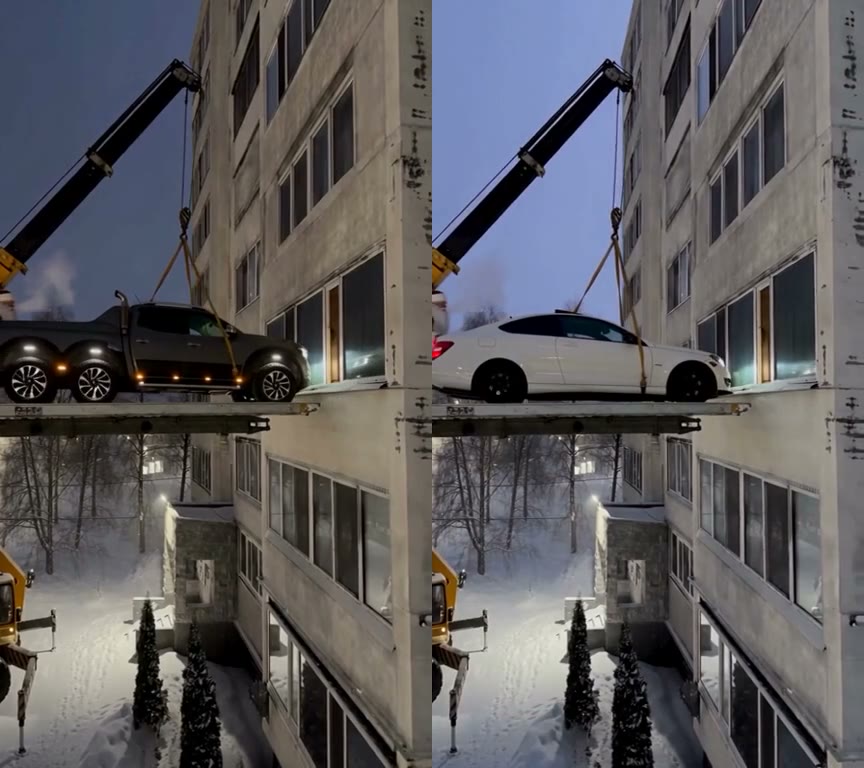
Upload your own MP4 or MOV of up to 120 seconds, or pick Christmas Car Delivery, a ready-made clip of a car lifted to a snowy apartment block.
- 2
Add two photos of your car
Add a front photo and a side or rear three-quarter photo of the same car, whole vehicle in frame. If there are several cars, say which one should change.
- 3
Pick a quality and generate
Choose 480p, 720p or 1080p, check the credit total, sign in and generate. Play the result once through, then download the MP4.
Ready-made car clips
Start from a prepared clip if you only have photos of your car. More car trends are added to the trend library as they are published.
What people make with Car Swap
Dream-car reveals
Put the car you just bought, or the one you want, into a delivery or reveal clip and share it with friends.
Holiday car videos
Christmas Car Delivery turns a winter crane delivery into a clip with your car on the lift.
Styling and wrap previews
See a colour, wrap or wheel change in motion on your own footage before committing to it.
Social edits and memes
Swap the car in a clip you filmed for a Reel, Short or TikTok, and label it as AI-generated.
What is an AI car swap?
An AI car swap replaces a vehicle in an existing video with the car shown in your photos. The source clip sets the shot, camera movement and action. A front photo and a side or rear three-quarter photo give ActLike AI two views of the replacement vehicle.
It is not a sticker or a 3D model laid over the footage. The model redraws the vehicle in every frame from your two reference photos, following the original car’s position, speed and perspective, so the replacement turns, brakes and catches the light the way the original did.
People also search for an AI car colour swap or wheel swap. Car Swap handles those too, as long as your photos show the car the way you want it: use two photos of the same model in the new colour, or of your car with the new wheels.
What changed in this road test?
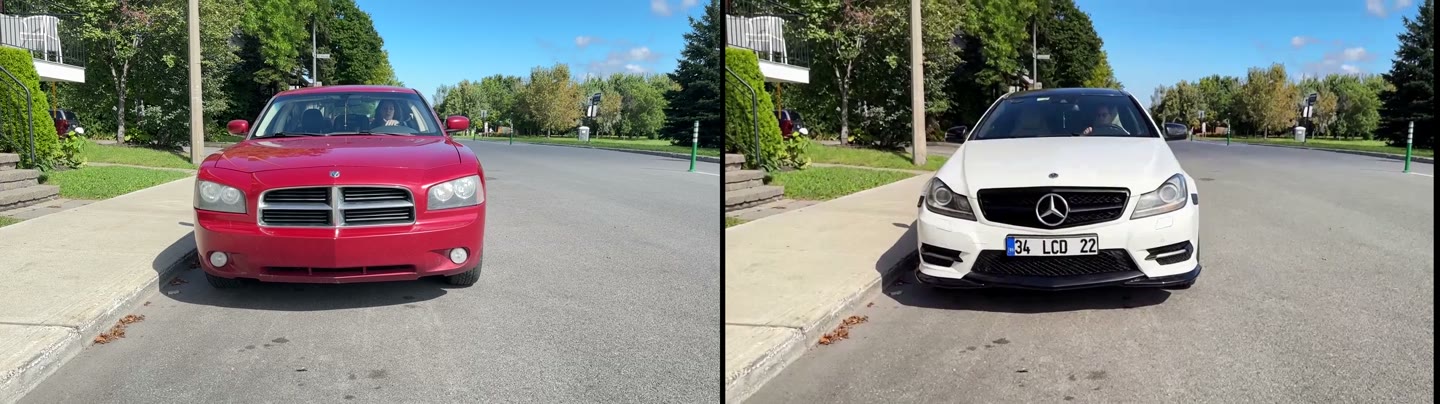
In the road test above, a red car pulling away from the curb was replaced by a white coupe from the two photos shown under the video. The instruction sent to the model was “replace red car by the car in the image”.
| Check | What we saw |
|---|---|
| Recognizable details | The white body, black wheels and coupe silhouette are visible as the vehicle leaves the curb. |
| Differences to check | The white car moves off a little earlier. The side window is darker and the driver is less visible. |
Watch the road test on its own page to step through it frame by frame.
Choose your source clip before taking the photos
Watch the clip once and note how much of the car is visible. A parked car filmed from the front needs a clear front reference. A drive-by that reveals the side and rear benefits from a second photo taken from behind at an angle. For a first test, pick a short, continuous shot with one car in view and an unobstructed outline.
If the vehicle passes behind a wall or another car, try a brief section where it is clearly visible before processing the full clip. That makes it easier to tell whether any shape or trim changes come from the references or from a difficult part of the footage.
Show the front and side of the same car
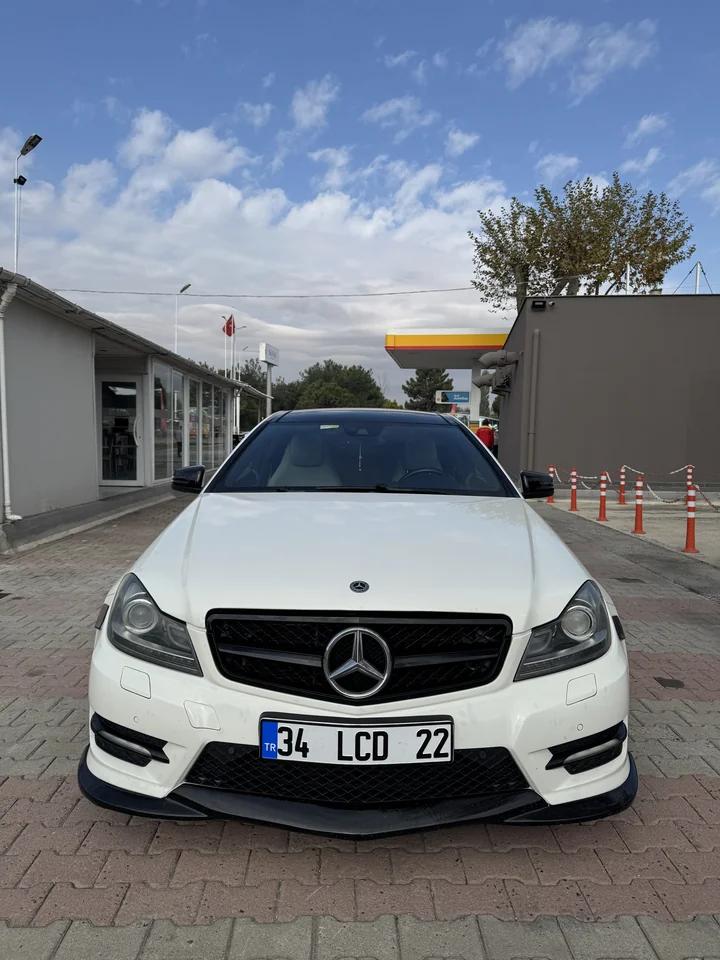
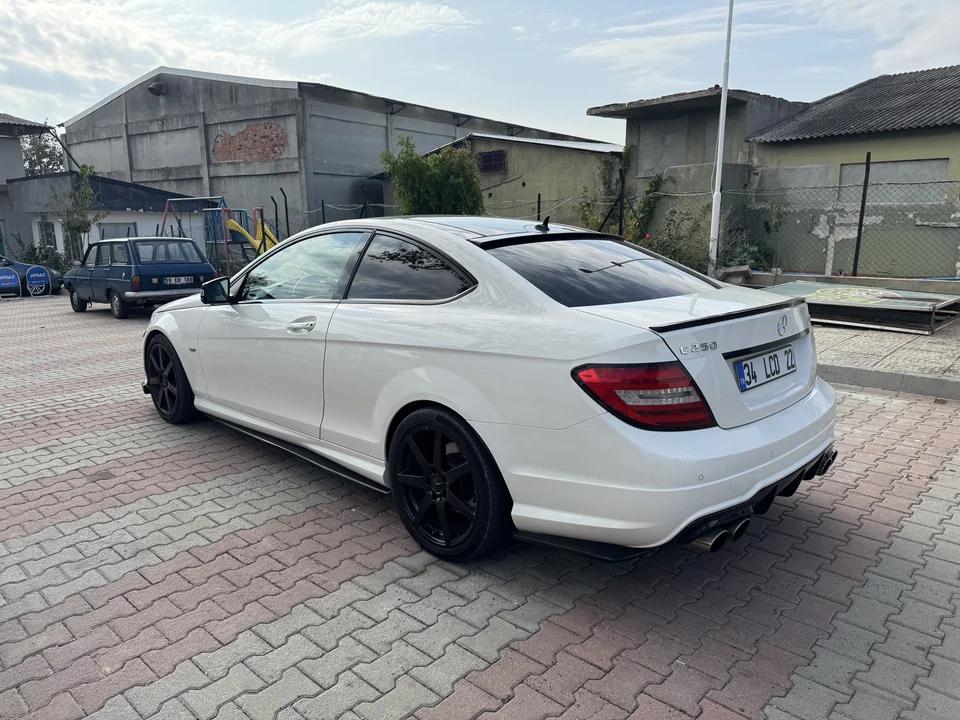
Use the same paint, wheels and trim in both photos. Frame the entire front so the headlights, grille and bumper are visible together. For the second view, step back until both wheels on the visible side and the roofline fit in the frame. Use a rear three-quarter view if the tail lights and trunk appear in the video.
Avoid mixing photos of two similar cars or combining stock photos with pictures of a modified vehicle. For the white coupe above, the front photo showed the grille and bumper, and the rear three-quarter photo showed the black wheels, side profile and rear trim.
What should I write in a car swap prompt?
In the studio, “Which car should change?” identifies the vehicle in the original video. Use a short description that separates it from the others, such as “the red car by the curb” or “the silver SUV nearest the camera”. The two photos already show what should take its place. You can leave this field empty when the main vehicle is clear.
The road test above used this instruction in the model: “replace red car by the car in the image”. In ActLike AI, enter “the red car by the curb” in the target field and attach the two photos. The studio sends the replacement instruction with your references.
Review the replacement as the car moves
Start the comparison at the first frame and check the stance, front bumper and wheel position. Play through the turn or pull-away and compare the side profile, ground contact and the point where the car begins to move. In our road test the white coupe kept its main silhouette and black wheels, but moved off a little earlier and had a darker side window.
This workflow is useful for a personal car reveal, a proposed styling change or a social edit based on footage you already have. If you need to show a particular vehicle exactly as it is for a sale, use the real recording for the listing and check the AI edit separately for details such as plates, badges and trim.
Car photo checklist for an AI car swap
- Both photos show the same car, with the same paint, wheels and trim.
- The whole vehicle is in frame in each photo, with a little space around it.
- Daylight or even light, no strong reflections hiding the body lines.
- Photo 1: straight front view with headlights, grille and bumper.
- Photo 2: side or rear three-quarter view with both visible wheels, the roofline and the tail lights.
- JPG or PNG under 10 MB each; save iPhone HEIC photos as JPG first.
How much does an AI car swap cost?
Car Swap is billed like every ActLike AI video: per second of the clip, rounded up, at 1 credit per second at 480p, 2 at 720p, 3 at 1080p (clips up to 30 s).
| Clip | 480p | 720p | 1080p |
|---|---|---|---|
| Christmas Car Delivery (10 s) | 480p: 10 credits | 720p: 20 credits | 1080p: 30 credits |
| Your clip, 10 s | 480p: 10 credits | 720p: 20 credits | 1080p: 30 credits |
| Your clip, 15 s | 480p: 15 credits | 720p: 30 credits | 1080p: 45 credits |
| Your clip, 30 s | 480p: 30 credits | 720p: 60 credits | 1080p: 90 credits |
The Mini pack (15 credits, $3.49 US list price) covers Christmas Car Delivery at 480p. Credits never expire while your account is open, and a failed render returns its credits automatically. See every pack on the pricing page.
What AI car swap cannot do (yet)
The model rebuilds the car from two photos, so small details can drift: badges, number plates, fine wheel spokes and interior trim are the first to change. Very fast pans, cars that pass behind other objects and night footage with heavy reflections are harder than a steady, well-lit shot. Do not use a Car Swap result as the photo of a car you are selling; use the real recording for listings. Car Swap is a web studio feature; the iPhone app focuses on people and characters.
Face Swap or Car Swap: which studio do you need?
Both studios edit a real video instead of animating a still image, and both bill the same way: 1 credit per second at 480p, 2 at 720p and 3 at 1080p. The difference is what gets replaced.
| At a glance | Face Swap | Car Swap |
|---|---|---|
| What changes | The whole person: face, hair, build and outfit | The vehicle: body, paint, wheels and trim |
| What you add | One or two photos of the person (two people in Two-Person Swap), or a description | Two photos of the same car: front and side or rear three-quarter |
| What stays | Motion, timing, camera, background and original sound | The shot, camera movement and the rest of the scene |
| Ready-made clips | Trend clips such as Seaside Arrival and Gentleman Move | Christmas Car Delivery |
Guides and ideas
All guides →- TutorialsBefore and After Video Maker: Free Template and Editing GuideJoin a before clip and an after clip with “Before” and “After” text in a free browser editor, with a ready template, filming tips and an AI option for when you have no real “after” yet.Read the guide
- IdeasBirthday AI Video: Star the Birthday Person in a Trend or Your Own ClipOne photo of the birthday person, a funny clip, and they are the star: the friend who insists on paying, the guest on the red carpet, the dog at the dinner table. Ideas, the right photo, the free editor for the birthday message, the cost and the rules.Read the guide
- TutorialsHow to Make Trending AI Videos Starring YouPick a viral clip, add one photo, keep every move and the original sound. How the AI video trend works, what each trend costs and how to post it on TikTok or Reels.Read the guide
- TutorialsHow to Replace a Person in a Video With AI: From Clip to Finished VideoEverything a first-time user needs: which clips work, which photos fail, what each setting costs, and how to fix a soft result.Read the guide
AI car swap questions
Can I upload my own video for Car Swap?
Yes. Upload your own clip or pick Christmas Car Delivery as a ready-made starting point. Both options take two views of the car you want to put in the shot.
Why use two photos of the same car?
The front photo gives the model the headlights and grille. A side or rear three-quarter photo gives it the roofline, wheels and rear shape as the angle changes.
Will the rest of the shot stay the same?
The model aims to keep the driver, scene and camera movement. In this example the road and framing are recognizable, while the replacement car starts moving slightly earlier and the side window is darker.
How much does a car replacement video cost?
This 13-second billed example would cost 26 credits at 720p in the web studio. You see the total before generating.
Can I put my own car in a video?
Yes. Open actlikeai.video/create/car-swap, upload a clip or choose Christmas Car Delivery, add a front and a side or rear three-quarter photo of your car and generate. Christmas Car Delivery costs 10 credits at 480p.
Does Car Swap work on a phone?
Yes. The Car Swap studio runs in Safari and Chrome on iPhone and Android, and on a computer. Sign in with Google or email to keep your videos and credits.
Is AI car swap the same as a car face swap?
It is the same idea for vehicles: instead of a person, the car in the clip is replaced by the car in your photos, while the shot and camera move stay.
Keep reading
- Car Swap studioUpload your clip and two car photos.
- Christmas Car DeliveryThe ready-made holiday car clip.
- Road test before and afterA red car replaced by a white coupe.
- All video trendsPerson and car trends in one place.
- Face swap videoReplace the person instead of the car.
- Credit pricesOne-time packs, no subscription.
AI car swap: put your car in any video
One-time packs from 15 credits for $3.49 (US list price), no subscription. The studio shows the credit total before you generate.
Open Car Swap studio



 Listed on Dang.ai