
Object Swap studio
Replace object in video with AI: any item, one photo
Upload your clip, add one photo of the new object and say which object should change. ActLike AI swaps the item in every frame while the hands, motion, camera and the rest of the scene stay. It runs in your browser, with no masking or tracking to do.
One-time packs from 15 credits for $3.49 (US list price), no subscription. The studio shows the credit total before you generate.
At a glance
- You add
- Your own clip, one photo of the new object, and a few words saying which object changes.
- What changes
- Only the object you name: its shape, colour, material and details come from the photo.
- What stays
- The person, hands, motion, camera, background, lighting and the original sound.
- Clip limits
- MP4 or MOV, up to 120 seconds and 250 MB; 1080p for clips up to 30 s.
- Cost
- 1 credit per second at 480p, 2 at 720p, 3 at 1080p (clips up to 30 s). A 5-second clip is 5 credits at 480p.
- No masking
- No rotoscoping, keyframes or tracking: the model finds and follows the object from your description.
Updated 22 November 2026 by ActLike AI. Prices and limits are the web studio’s current rules.
How to replace an object in a video
- 1
Upload the clip
Choose an MP4 or MOV of up to 120 seconds where the object stays visible, for example a product held to the camera.
- 2
Add the new object
Add one photo of the replacement object alone on a plain background, then write which object should change, such as “the white mug in her hands”.
- 3
Pick a quality and generate
Choose 480p, 720p or 1080p (clips up to 30 s), tick the consent box, sign in and generate. Download the MP4 when it is ready.
Recorded example
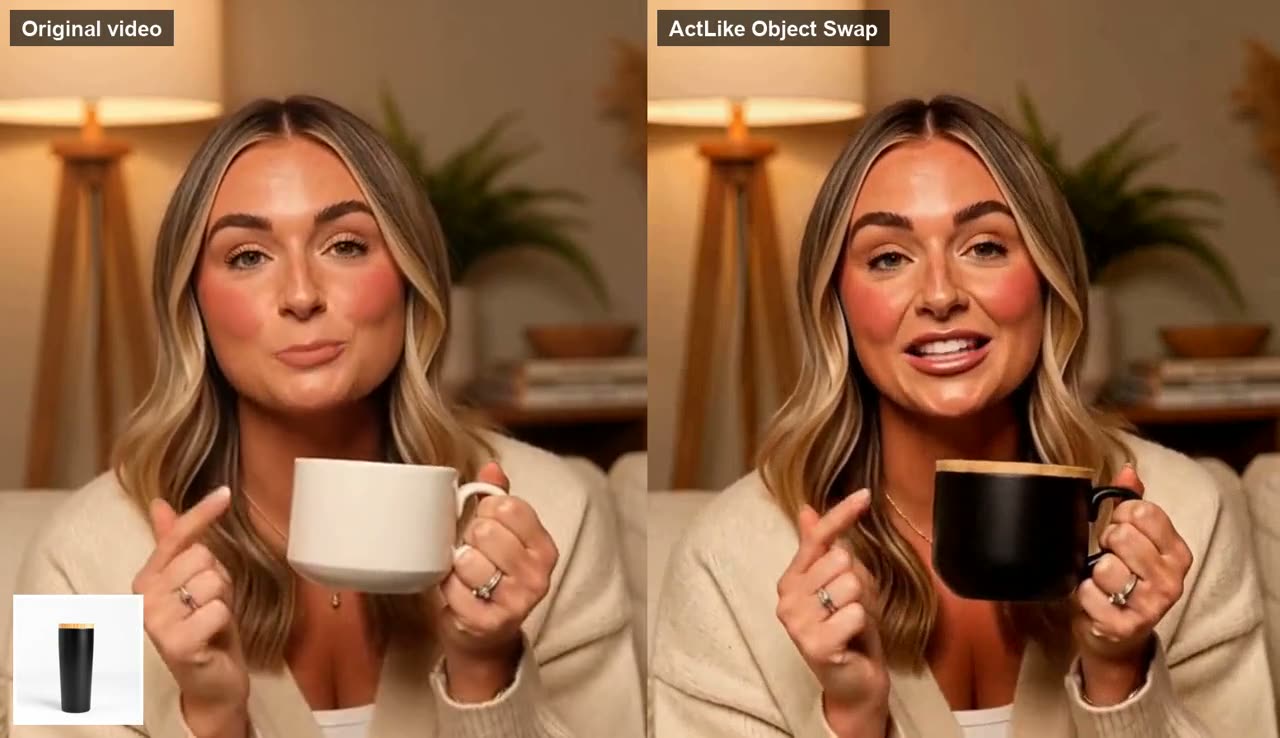
The example below was made with the same model and prompt the studio uses: a 5-second clip, one product photo, nothing else.

What people use Object Swap for
Product videos and ads
Put your own product into a UGC-style clip or an older ad without reshooting the presenter.
Packaging and colour tests
See a new bottle, can or colour in motion before you print or produce it.
Props for creators
Swap a prop in a sketch or a trend clip for a funnier one, and post it labelled as AI.
Mock-ups for clients
Show a client how their product looks in a reference video before booking a shoot.
What is an AI object swap in a video?
An AI object swap replaces one item in an existing video with the item in your photo, in every frame. ActLike AI redraws the object to follow the original one: where it is, how it moves, how it is held and how the light falls on it. You do not mask, track or keyframe anything; you describe the object in a few words.
| From your photo | From the clip |
|---|---|
| Shape, colour and material of the object | Its position, size in the frame and motion |
| Visible details such as a lid, handle or label | The hands and people around it |
| Camera, background, lighting and sound |
What did the example change?
The source is a 5-second, AI-generated clip of a woman on a sofa holding up a white ceramic mug while she talks, like a product review. We ran it twice with the same instruction, “the white ceramic mug she holds”, and two different product photos.
| Reference photo | What came through | What did not |
|---|---|---|
| Teal speckled enamel mug (same shape) | Colour, white speckles, silver rolled rim, handle; it stays in her hands for all 5 seconds | Nothing visible; face, hands and room unchanged |
| Black tumbler with bamboo lid (different shape) | Matte black finish and the bamboo top | The tall, handle-less shape: the model kept the mug’s handle and size |
Which photo of the new object works best?
One clear photo of the object alone works best: the whole object in frame, on a plain background, in soft even light. The model copies what it sees, so the photo decides the shape, colour, material and details in the video.
- Shoot it from roughly the angle it has in the clip: a mug held from the side needs a side view with the handle visible.
- Plain white or grey background, no hands, no other objects, no busy packaging around it.
- Similar size and use to the original: a mug for a tumbler or a bottle works better than a mug for a laptop.
- Logos and printed text only if they are yours; small text can blur or change in motion.
- JPG or PNG under 10 MB; save iPhone HEIC photos as JPG first.
How do I say which object should change?
Write the object as you would point it out to someone watching: colour, type and where it is. Short and specific works best.
- “the white mug in her hands”
- “the green bottle on the table, left of the laptop”
- “the black backpack he wears”
- “the phone in his right hand”
If two similar objects are in the shot, add what separates them (left or right, front or back). Only the object you name changes; everything else stays as filmed.
How much does it cost to replace an object in a video?
Object Swap is billed per second of the clip, rounded up: 1 credit per second at 480p, 2 at 720p, 3 at 1080p (clips up to 30 s). There is no extra charge for the object photo.
| Clip length | 480p | 720p | 1080p |
|---|---|---|---|
| 5 s | 480p: 5 credits | 720p: 10 credits | 1080p: 15 credits |
| 10 s | 480p: 10 credits | 720p: 20 credits | 1080p: 30 credits |
| 15 s | 480p: 15 credits | 720p: 30 credits | 1080p: 45 credits |
| 30 s | 480p: 30 credits | 720p: 60 credits | 1080p: 90 credits |
Credits come in one-time packs from 15 credits for $3.49 (US list price), with no subscription. A render that fails gives its credits back automatically. All packs are on the pricing page.
Can I change the colour of an object or replace a logo?
Yes, through the photo. To change the colour of an object in a video, upload a photo of the same object in the new colour. To change a logo or label, upload a photo of the object with your own logo on it. Use only logos and designs you own or may use, and expect very small text to soften in motion.
What Object Swap cannot do (yet)
Glass, liquids and mirror-like surfaces are harder than matte objects. Tiny objects, objects that leave the frame or are mostly hidden behind hands, and very fast motion can drift. A very different size or shape than the original (a mug for a guitar) rarely looks natural. Object Swap works on your own clips in the web studio; ready-made object trends will follow. Objects must follow the acceptable use policy.
Guides and ideas
All guides →- TutorialsBefore and After Video Maker: Free Template and Editing GuideJoin a before clip and an after clip with “Before” and “After” text in a free browser editor, with a ready template, filming tips and an AI option for when you have no real “after” yet.Read the guide
- IdeasBirthday AI Video: Star the Birthday Person in a Trend or Your Own ClipOne photo of the birthday person, a funny clip, and they are the star: the friend who insists on paying, the guest on the red carpet, the dog at the dinner table. Ideas, the right photo, the free editor for the birthday message, the cost and the rules.Read the guide
- TutorialsHow to Make Trending AI Videos Starring YouPick a viral clip, add one photo, keep every move and the original sound. How the AI video trend works, what each trend costs and how to post it on TikTok or Reels.Read the guide
- TutorialsHow to Replace a Person in a Video With AI: From Clip to Finished VideoEverything a first-time user needs: which clips work, which photos fail, what each setting costs, and how to fix a soft result.Read the guide
Object Swap questions
How do I replace an object in a video with AI?
Open actlikeai.video/create/object-swap, upload your clip, add one photo of the new object, write which object should change and generate. ActLike AI replaces it in every frame and keeps the hands, motion and camera. A 5-second clip costs 5 credits at 480p.
Do I need to mask or track the object?
No. ActLike AI finds and follows the object from your short description, such as “the white mug in her hands”. There are no masks, keyframes or tracking points.
Can I put my product into a video?
Yes. Upload a clip where an object is held or shown, add a clean photo of your product and name the object to replace. It works well for UGC-style product clips and mock-ups.
Can I swap more than one object?
One object per video in the studio today. To change two objects, render the clip twice, using the first result as the source for the second.
Does Object Swap keep the sound?
Yes. The person, motion, camera, background and original sound stay as in your clip; only the named object changes.
Is Object Swap in the iPhone app?
Not yet. Object Swap is in the web studio, which also works in a phone browser.
Keep reading
- Object Swap studioUpload a clip and one object photo.
- AI Car SwapReplace a car with two photos of yours.
- Face swap videoReplace the person instead of an object.
- AI UGC video costWhat product-style clips cost to make.
- For businessesCharacter and product video for teams.
- Credit pricesOne-time packs, no subscription.
Replace object in video with AI: any item, one photo
One-time packs from 15 credits for $3.49 (US list price), no subscription. The studio shows the credit total before you generate.
Open Object Swap studio



 Listed on Dang.ai