
How to Make Trending AI Videos Starring You
Pick a viral clip, add one photo, keep every move and the original sound. How the AI video trend works, what each trend costs and how to post it on TikTok or Reels.
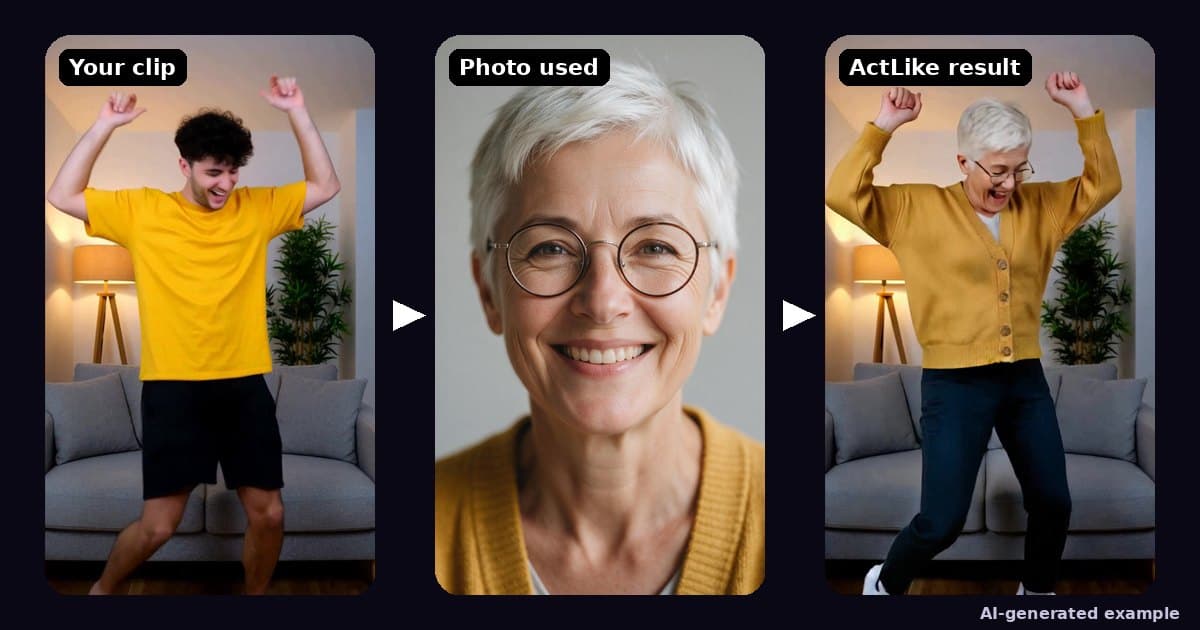
Try it while you read
ActLike AI runs in your browser and on iPhone with one account. Web packs start at $3.49 by card. No subscription.
Make a video in your browserOr on iPhone:


Only use photos of yourself or of people who have given permission. No real public figures without their permission, no sexual content and nothing made to deceive. Every result is AI-generated: share it as AI-generated. The rules
How do you make trending AI videos with yourself in them?
To make a trending AI video starring you, pick a viral clip from the ActLike AI trends page, add one clear photo of yourself and press Make the video. The AI puts you in the role while keeping every shot, move and the original sound. Sushi Master (10.04 s) uses 11 credits at 480p, because every started second counts; the smallest web pack is 15 credits for $3.49 (US list price).
On this page
What a “trending AI video” actually is
When people search for how to make trending AI videos, they usually mean one of three different things, and the right tool depends on which one you want. Some AI trends are still pictures (a polaroid, a younger-self portrait), some are brand-new scenes generated from a text prompt, and some are a known viral clip where you appear as the main character. This guide is about the third kind: a real, recognisable clip with you in it.
| Kind of AI trend | What you give it | What you get | Best for |
|---|---|---|---|
| Photo trends | What you give it: A photo and a style prompt | What you get: A new still image | Best for: Profile pictures, carousels |
| Prompt-to-video | What you give it: A text prompt, sometimes a photo | What you get: A new scene the model invents | Best for: Original short scenes |
| Star in a viral clip | What you give it: One photo of you and a trend clip | What you get: The same clip, same moves and sound, with you in the role | Best for: Joining a trend everyone recognises |
The difference matters for trends. A trend works because viewers already know the beat: the wallet with the sponges, the chef who never smiles. A prompt-to-video model makes something new, so the timing and the joke drift. Starring in the clip itself keeps the parts people came for and changes only who is on screen.
How to make a trending AI video in five steps
Everything below happens in the browser at actlikeai.video/create, on a phone or a computer. You can build the whole video before signing in; sign-in and payment come at the end.
- 1Pick a trendOpen the trends page and choose a clip. Each trend page shows the story, who you become and the exact credit cost, then a Use this trend button that opens the studio with the clip already chosen.
- 2Add one photo of yourselfOne clear, front-facing photo, alone in the picture, in even light, with no sunglasses or hands over the face. Your clothes come from the photo too, so wear something that suits the scene. For trends where you are seen head to shoes, use a full-body photo.
- 3Choose the quality480p is the quick, cheaper version and is fine for a phone feed. 720p costs twice as many credits per second and is the one to pick if you plan to post it as your main video.
- 4Make the videoPress Make the video, sign in, and pay with credits. A short trend usually takes a few minutes. If a render fails, its credits come back automatically.
- 5Watch it before you postCheck it in motion, not as a still: the face during turns, the hands, the clothes. Then download it and post it with the platform’s AI label switched on.
Trends you can star in right now, and what they cost
These are the clips live on the site today. Credits are counted the same way the studio counts them: 1 credit per second at 480p and 2 per second at 720p, with each started second counted as a whole one.
| Trend | You become | Length | 480p | 720p | Photo tip |
|---|---|---|---|---|---|
| Dinner’s On Me | You become: The man who insists on paying, then ends up at the sink | Length: about 11 s | 480p: 12 credits | 720p: 24 credits | Photo tip: Face and upper body, dressed for a date |
| Sushi Master | You become: The deadpan chef with the giant cleaver | Length: about 10 s | 480p: 11 credits | 720p: 22 credits | Photo tip: A serious face; pets work too |
| Gentleman Move | You become: The man who steps into the bushes to let someone pass | Length: about 8 s | 480p: 9 credits | 720p: 18 credits | Photo tip: Full body, head to shoes |
| Aura Farming | You become: The calm guest working the room at a fashion gala | Length: about 18 s | 480p: 19 credits | 720p: 38 credits | Photo tip: Full body, dressed for a gala |
| Road Trip Reunion | You become: The driver who meets a childhood friend again on a sunset highway | Length: 30 s | 480p: 30 credits | 720p: 60 credits | Photo tip: Waist up or full body; a 4:3 clip, not vertical |
| Seaside Arrival | You become: The man who steps out of a red convertible by the sea at night and walks off | Length: about 10 s | 480p: 11 credits | 720p: 22 credits | Photo tip: Full body, head to shoes |
Open Dinner’s On Me, Sushi Master, Gentleman Move, Aura Farming, Road Trip Reunion or Seaside Arrival to see each story shot by shot. All six keep the original sound. New trends are added to the trends page as they are made, newest first, so check it before you film anything yourself. Three of them also take a pet photo; the guide to making an AI video of your dog shows which photo works.
Making a trend from your own clip
If the trend you want is not on the site yet, you can upload a clip instead, up to 120 seconds long. It has to be a clip you are allowed to reuse: one you or a friend filmed, or one whose owner and performers agreed. Re-uploading someone else’s viral video with you pasted in is not covered by the terms, and real public figures are never allowed.
- Film the trend yourself first. Copy the moves and camera angle with your phone. Then put yourself, or a friend who agreed, in the polished version.
- Tell the studio who to replace. If the clip has several people, describe who should become you, for example “the man in the black t-shirt on the right”.
- Two people at once. With your own clip, you can add a second person with their own photo, so a couple or two friends can both appear.
- Start short. A 5-second test costs 5 credits at 480p. Make the long version only once the short one looks right.
The put my face in a video guide goes deeper on choosing a clip and a photo that work well together.
Can you make trending AI videos for free?
Not fully, and it is better to know that before you start. Browsing trends, uploading your photo and setting the video up costs nothing on ActLike AI; the render itself is paid with credits, because every second of video costs real computing time. There is no subscription, and credits do not expire while your account is open.
| Web pack | Credits | US list price | Enough for |
|---|---|---|---|
| Mini | Credits: 15 | US list price: $3.49 | Enough for: Any one of the trends above that runs up to 15 seconds, at 480p |
| Starter | Credits: 50 | US list price: $11.49 | Enough for: About four trends at 480p, or two at 720p |
| Creator | Credits: 100 | US list price: $15.99 | Enough for: About eight trends at 480p |
| Pro | Credits: 250 | US list price: $30.99 | Enough for: About twenty trends at 480p |
| Studio | Credits: 500 | US list price: $44.99 | Enough for: About forty trends at 480p |
Prices are the card prices on the pricing page, which is always the final word. Larger packs cost less per credit: at US list prices, from about 23 cents a credit in Mini down to 9 cents in Studio.
Posting it on TikTok, Reels and Shorts
- 1Download the videoThe file keeps the trend’s own shape. Most trend clips are vertical and ready for TikTok, Instagram Reels and YouTube Shorts without cropping; Road Trip Reunion is a wider 4:3 clip that suits a regular feed post.
- 2Switch on the AI labelTikTok, Instagram and YouTube each have a setting that marks a post as AI-generated or altered. Turn it on. It keeps the post within the platform’s rules and is honest with viewers.
- 3Write a caption that joins the trendUse the trend’s name in the caption and a hashtag or two people already search, such as the trend name itself. Keep the original sound; it is part of why people stop scrolling.
- 4Post the best take, not every takeIf you made two versions, post the one where your face reads best in the first second. That is where most viewers decide to keep watching.
The rules that keep it fun
- Your own photo, or someone who agreed. Ask before you use a friend’s picture, every time.
- No public figures. Celebrities, politicians and creators are off limits, even as a joke.
- Always AI-generated. Say so in the post and use the platform label. Never present the result as real footage.
These rules are in the acceptable use policy. They also make the video better: a trend lands because viewers know it is you having fun with it.
Questions about this guide
How do I make the AI video trend with my own face?
Open a trend on ActLike AI, add one clear photo of yourself and press Make the video. The AI keeps every shot, camera move and the original sound of the clip and puts you in the main role. It runs in the browser on a phone or a computer.
How much does a trending AI video cost?
Trends are charged by length: 1 credit per second at 480p, 2 per second at 720p. Sushi Master (10.04 s) uses 11 credits at 480p, because every started second counts. The smallest web pack is 15 credits for $3.49 (US list price), there is no subscription and credits do not expire while your account is open.
Can I make trending AI videos for free?
You can browse trends and set up the video for free, but the render itself is paid with credits. If a render fails, its credits are returned automatically.
Does the video keep the original song or sound?
Yes. On the trends from the ActLike AI trends page, the original sound stays exactly as it is; only the person in the clip changes.
Can two people be in the same trend video?
Yes, when you upload your own clip: add a second person with their own photo and say who in the clip each person should become. Both people must have agreed to appear.
Do I need to label the video as AI when I post it?
Yes. Use the AI-generated label that TikTok, Instagram and YouTube offer in their post settings, and say in the caption that it was made with AI.
More guides
Ready to make one yourself?
Reading gets you halfway. Open the web studio, follow the steps with your own clip, and you will have a finished video in a few minutes.
Prefer your iPhone? Same account and credits in the app:
Only use photos of yourself or of people who have given permission. No real public figures without their permission, no sexual content and nothing made to deceive. Every result is AI-generated: share it as AI-generated. The rules
iPhone requires iOS 17.0 or later. Android version on Google Play.


Written by ActLike AI · Web studio and iPhone app · Updated 12 November 2026




 Listed on Dang.ai