
Halloween Face Swap Video Ideas You Can Make Tonight
Twelve original monsters you can become in minutes, with the clip to film, the description to type and what each one costs.
Try it while you read
ActLike AI is on iPhone and Android. Credit packs start at $1.99, with no subscription.


How do you make a Halloween face swap video?
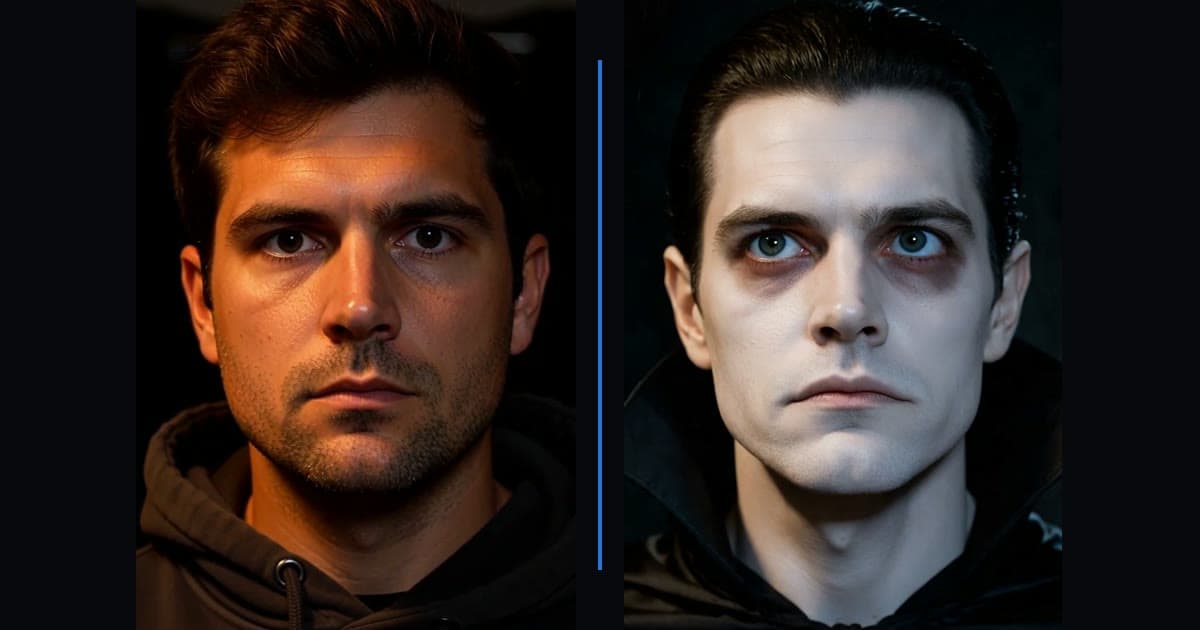
To make a Halloween face swap video with ActLike AI, film a short, well-lit clip of yourself acting out a scene, then describe an original monster such as "a pale vampire with slicked-back black hair and a high-collared black cape" instead of uploading a photo. Turn Scene Match on so the character fits your lighting. An 8-second 720p video with Scene Match uses 17 credits.
Why a Halloween face swap works best with a described character
A Halloween face swap usually means turning yourself into something that does not exist: a vampire, a zombie, a witch. There is no photo of that character to upload, which is exactly what the describe-a-character option in ActLike AI is for.
You film the motion, you type the monster, and the app builds the character onto your movement, as in the example above. Because the character is original, there is no question of whose face it is, and no famous film villain to worry about.
Filming a clip that survives the dark
Halloween footage tends to be dim, and darkness is the main reason a swap looks soft. Fake the spooky mood rather than filming in it.
- Light your face, darken the background. One lamp in front of you, room lights off behind you.
- Keep it to one person and keep the face visible from the very first frame. Starting with your back to the camera confuses the model and glitches the opening second; start side-on instead.
- Nothing across the face: no hands, masks or hair over it.
- Five to ten seconds. Credits are charged per second, and short clips hit harder on social feeds.
- Move deliberately. A slow turn to camera or a sudden lean-in reads better than frantic motion.
Then turn Scene Match on. It fits the character to the colour and direction of your lighting, which matters more on Halloween than any other time of year.
Twelve Halloween face swap ideas
Each idea lists the clip to film and a description you can paste into the app. Costs assume 720p Best Quality with Scene Match, which is 2 credits per second plus 1.
| Idea | Clip to film | Character to describe | Credits |
|---|---|---|---|
| The slow turn | 8 s: start side-on, then turn slowly to camera | A pale vampire with slicked-back hair and a high-collared black cape | 17 |
| The mirror | 6 s: look into a mirror, then at the lens | A grey-skinned ghost with hollow eyes and long wet hair | 13 |
| The stagger | 8 s: walk toward the camera unsteadily | A decaying zombie with torn clothes and cloudy eyes | 17 |
| The spell | 8 s: raise both hands as if casting | An old witch with green-tinted skin and a crooked black hat | 17 |
| The grin | 5 s: still face that slowly smiles | A scarecrow with a carved pumpkin smile and straw hair | 11 |
| The howl | 6 s: tilt head back and howl | A werewolf with grey fur, yellow eyes and sharp teeth | 13 |
| The whisper | 6 s: lean into the lens and whisper | A Victorian ghost child with pale skin and dark circles | 13 |
| The dance | 10 s: a short goofy dance | A cartoonish skeleton with a bright white skull | 21 |
| The experiment | 8 s: look up from a desk, wide-eyed | A mad scientist with wild white hair and cracked goggles | 17 |
| The reveal | 5 s: push a loose hood back from your face | A hooded figure with grey shadowed skin and sunken cheeks | 11 |
| The doll | 6 s: sit very still, then blink | A porcelain doll with cracked skin and painted cheeks | 13 |
| The costume test | 8 s: show your outfit to camera | Any costume you are thinking of buying, described in detail | 17 |
Drafting first? Run the same idea at 480p Credit Saver without Scene Match: an 8-second draft costs 8 credits. Remake only the version you like at 720p.
Writing a monster description that works
The description is your casting call. Short and specific beats long and vague.
- 1Start with the creature"A vampire", "a zombie", "a witch". Name the type first.
- 2Add two or three visible detailsSkin tone, eyes, hair or headwear. "Pale skin, red eyes, slicked-back black hair" gives the model something to draw.
- 3Skip the storyThe app needs what the character looks like, not who they are. Leave plot and backstory out.
- 4Keep it originalDescribe a type, not a named character from a film or game. Named characters are someone else’s intellectual property.
What carries over, and what does not
The example at the top of this page shows it honestly. The character replacement follows your performance closely, so anything your own face is doing stays yours.
- Carries over well: skin tone, hair, costume, collars and capes, overall face shape, and the lighting mood.
- Often does not: eye colour and teeth. The model keeps your own eyes and mouth movement, so red eyes or fangs may not appear, and fangs only show if your mouth opens.
- Your performance is everything: a slow turn, a stare or a smile comes from you. Act the moment you want to see.
Doing it with friends
A Halloween party is the perfect excuse for a group set: each friend films their own short clip and picks a monster. ActLike AI handles one person per clip, so make one video each and post them as a series.
Only make videos of friends who have agreed to it, and let them choose their monster. The acceptable use policy explains the consent rule in full.
Posting it
Save the video to your phone from History and post it as a vertical short. Many platforms ask you to label realistic AI content; on TikTok and similar apps, use the AI-generated label when it is offered.
For more ideas outside Halloween, see the examples page, and for the full walkthrough of the app, the face swap video tutorial.
Questions about this guide
Use 480p Credit Saver with Scene Match off and keep the clip short. A 5-second Halloween face swap video costs 5 credits, which fits the smallest ActLike AI pack of 5 credits for $1.99.
More guides
Ready to make one yourself?
Reading gets you halfway. Download ActLike AI, follow the steps with your own clip, and you will have a finished video in a few minutes.
iPhone requires iOS 17.0 or later. Android version on Google Play.


Written by Ege Alp · Developer, ActLike AI · Updated 13 October 2026