
Christmas AI Video Ideas: Become an Original Elf or Santa-Style Character
Ten original Christmas characters you can become on your phone, including an elf, with the clip to film, the description to type and what each one costs.
Try it while you read
ActLike AI runs in your browser and on iPhone with one account. Web packs start at $3.49 by card. No subscription.
Make a video in your browserOr on iPhone:


Only use photos of yourself or of people who have given permission. No real public figures without their permission, no sexual content and nothing made to deceive. Every result is AI-generated: share it as AI-generated. The rules
How do you make a Christmas AI character video?
To make a Christmas character video with ActLike AI, film a short clip of yourself acting out a festive moment, then describe an original character, such as "a cheerful elf with pointed ears, a green felt jacket and a red pointed hat", instead of uploading a photo. The app replaces the whole person in your clip, not only the face. A 5-second video at 720p with a described character uses 11 credits; at 480p it uses 6.
On this page
What a Christmas character video is, and how the app does it
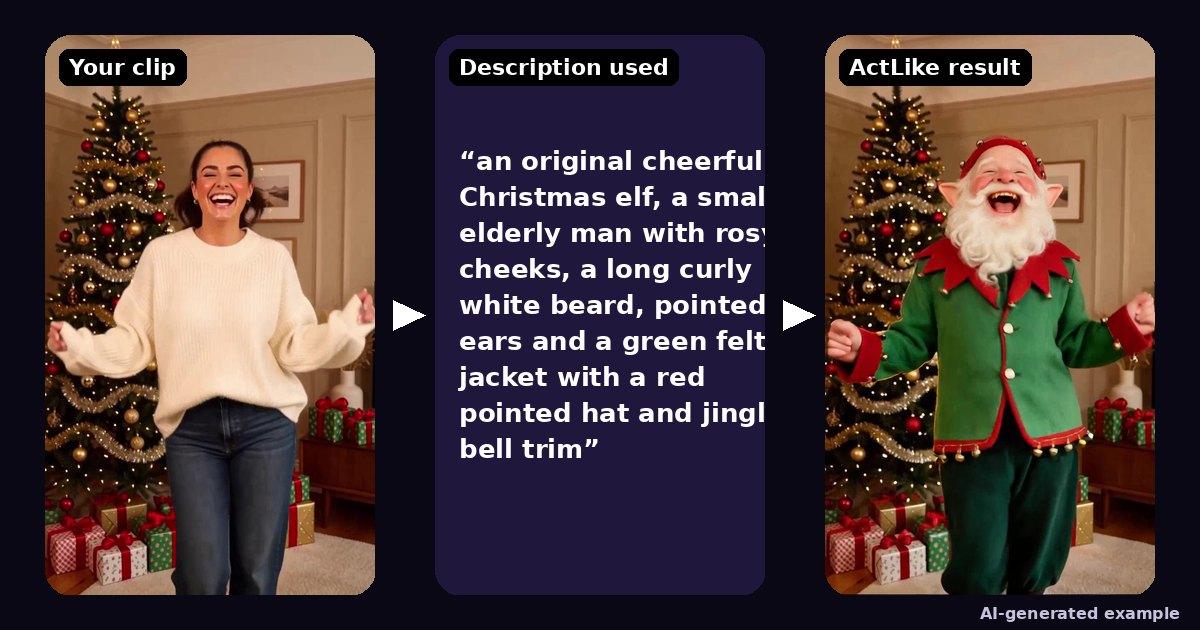
A Christmas character video usually means turning yourself or a willing friend into a festive character in a short clip: an elf, a snowman, a gingerbread baker. In ActLike AI the clip supplies the movement, timing and background, and a short text description supplies the new person. The app replaces the whole person in the clip, so hair, costume and build change too, not just the face. The example above shows a 5-second living-room dance beside a tree becoming an elf with a white beard and a green felt jacket; the dance and the laugh are unchanged.
This guide sticks to original characters. Named film, TV and holiday-special characters belong to someone else, and real people’s faces need their consent, so describe a type of character rather than a famous one. The acceptable use policy explains the rules, and the terms limit the licence to personal or internal creative use.
Elf video: the easiest Christmas character
An elf is the best first try because the look is simple to describe and reads clearly even in a soft render: pointed ears, rosy cheeks, a hat and a bright jacket. For the example above the description was "an original cheerful Christmas elf, a small elderly man with rosy cheeks, a long curly white beard, pointed ears and a green felt jacket with a red pointed hat and jingle bell trim". It rendered at 720p Best Quality for 11 credits.
What came across well: the beard, ears, hat and jacket with its bell trim, and the overall mood of the lighting. The laugh and the dance came from the original clip. As with any described character, small details such as exact eye colour may not carry over, so lean on costume, hair and headwear. Describe an elf as a type; do not name a particular movie elf.
For the full text-mode workflow, including how to word a description, read the AI character video maker guide. If you are new to the app, the iPhone walkthrough covers each screen, and the web studio works the same way in a browser.
Filming a clip that works indoors at Christmas
- One person in frame. The clip needs a single main performer; family shots and group hugs are likely to confuse the replacement. Make one video per person.
- Face visible from the first frame. Start facing the camera or side-on, not with your back turned.
- Light the face. Fairy lights look lovely but are dim. Add a lamp in front of you and turn Scene Match on so the character fits the room.
- Keep hands off the face and avoid heavy scarves or hats in your own clip that hide it.
- Five to ten seconds. Credits are charged per second, and short clips suit social feeds.
Only film people who have agreed to appear, and let them pick the character. Use a clip you shot yourself or may legally reuse.
Ten original Christmas character ideas
Each idea lists a clip to film and a description to paste into the app. Costs assume 720p Best Quality and a described character: 2 credits per second plus one extra credit, which Scene Match and the description share. At 480p Credit Saver the same idea costs 1 credit per second plus 1.
| Idea | Clip to film | Character to describe | Credits at 720p |
|---|---|---|---|
| The dancing elf | Clip to film: 5 s: a goofy dance by the tree | Character to describe: A cheerful elf with a long white beard, pointed ears, a green felt jacket and a red hat with jingle bells | Credits at 720p: 11 |
| The gift reveal | Clip to film: 6 s: open a box and gasp | Character to describe: A wide-eyed gingerbread baker with flour on her apron and a tall white chef’s hat | Credits at 720p: 13 |
| The jolly host | Clip to film: 8 s: wave and laugh to camera | Character to describe: A jolly old man in a red velvet coat with white fur trim and a round white beard (an original gift-giver, not a named character) | Credits at 720p: 17 |
| The snow day | Clip to film: 6 s: shiver and rub your hands | Character to describe: A friendly snowman with a carrot nose, coal smile, knitted scarf and top hat | Credits at 720p: 13 |
| The carol | Clip to film: 8 s: sing to the lens | Character to describe: A Victorian carol singer in a long wool coat, red scarf and bonnet, with rosy cheeks | Credits at 720p: 17 |
| The workshop | Clip to film: 8 s: hammer and smile at a desk | Character to describe: A cheerful toy maker with round glasses, a leather apron and a paper crown | Credits at 720p: 17 |
| The sparkle | Clip to film: 5 s: turn slowly and look up | Character to describe: A frost fairy with pale blue skin, silver hair and a crown of icicles | Credits at 720p: 11 |
| The reindeer hat | Clip to film: 5 s: nod your head to a beat | Character to describe: A friendly reindeer-costume character with soft brown fur, antlers and a red nose | Credits at 720p: 11 |
| The cocoa | Clip to film: 6 s: sip from a mug and sigh | Character to describe: A cosy winter hiker in a chunky cream knit hat and a bright red parka | Credits at 720p: 13 |
| The grand finale | Clip to film: 10 s: dance and spin | Character to describe: An elegant nutcracker toy soldier in a blue uniform with gold buttons and a tall black hat | Credits at 720p: 21 |
Drafting first? Run the same idea at 480p Credit Saver: a 5-second draft with a described character costs 6 credits. Remake only the version you like at 720p.
What a Christmas character video costs
| Clip and settings | Credits |
|---|---|
| 5 seconds, 480p, described character | 6 |
| 5 seconds, 720p, described character (the example above) | 11 |
| 10 seconds, 720p, described character | 21 |
| 120 seconds (the longest), 720p, described character | 241 |
ActLike AI is a $0 download on the App Store (iOS 17 or later) and also runs in the web studio in a browser, with the same account and balance. Making a video uses purchased credits; there is no free generation and no subscription. See the pricing page. A failed generation returns its credits automatically.
Questions about this guide
How do I make an elf video of myself?
Film a 5 to 10 second clip of one person, then choose to describe a character and type something like "a cheerful elf with pointed ears, a green felt jacket and a red pointed hat". The app replaces the person in your clip with that original elf. A 5-second video at 720p costs 11 credits, or 6 at 480p.
Can I turn myself into Santa or Buddy the Elf?
Not a named character. Characters from films and holiday specials are someone else’s intellectual property. Describe an original character instead, such as a jolly old man in a red coat with a white beard, or a cheerful elf with your own details.
Is there an app for a Christmas character video?
ActLike AI replaces the person in a short video clip using a photo or a text description, and it works on iPhone (iOS 17 or later) and in the web studio in a browser. It is a $0 download, but making a video uses purchased credits.
What is the longest Christmas video I can make, and what does it cost?
Clips can be up to 120 seconds. With a described character, a 20-second video uses 21 credits at 480p or 41 at 720p, because Scene Match and the description share one extra credit. Try a 5-second draft first.
More guides
Ready to make one yourself?
Reading gets you halfway. Open the web studio, follow the steps with your own clip, and you will have a finished video in a few minutes.
Prefer your iPhone? Same account and credits in the app:
Only use photos of yourself or of people who have given permission. No real public figures without their permission, no sexual content and nothing made to deceive. Every result is AI-generated: share it as AI-generated. The rules
iPhone requires iOS 17.0 or later. Android version on Google Play.


Written by ActLike AI · Web studio and iPhone app · Updated 11 November 2026




 Listed on Dang.ai