
AI Video of My Dog: Make Your Dog Dance or Star in a Trend
One photo of your dog, and it walks into the bushes, plays the deadpan sushi chef or dances your own choreography. Which photo works, which clips take a pet, what it costs and what it cannot do yet.
Try it while you read
ActLike AI runs in your browser and on iPhone with one account. Web packs start at $3.49 by card. No subscription.
Make a video in your browserOr on iPhone:


Only use photos of yourself or of people who have given permission. No real public figures without their permission, no sexual content and nothing made to deceive. Every result is AI-generated: share it as AI-generated. The rules
How do I make an AI video of my dog?
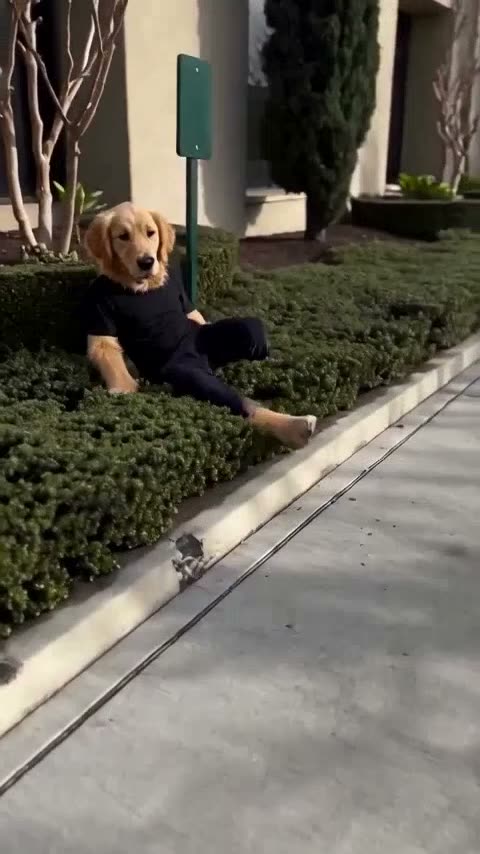
To make an AI video of your dog with ActLike AI (actlikeai.video), pick a trend that takes a pet photo, such as Gentleman Move, Sushi Master or Dinner's On Me, or upload your own dance clip, then add one sharp, front-on photo of your dog. Your dog is drawn standing upright and takes the lead role with the clip's moves and sound. Gentleman Move uses 9 credits at 480p.
On this page
What an AI video of my dog actually looks like
Most people who search for an AI video of my dog picture one of three things: a dog that dances like a person, a dog that talks, or a dog dropped into a funny viral clip. ActLike AI does the first and the third, and it does them from a single photo, without a text prompt. It does not make your dog talk; more on that below, so you know before you buy anything.
The method is different from apps that wiggle a still photo. ActLike AI replaces the person in a real video clip. The clip brings the movement, the timing, the camera, the background and the sound; your photo brings the new look. With a person, that look is the face, hair, build and clothes. With a dog or a cat, the AI takes one extra step: it first redraws your pet as an upright character that stands on two legs like a person, with paws for hands, and then puts that character into the clip.
So your dog is not pasted on top of the actor on four legs. It plays the part. If the man in the clip steps into a hedge at second three, your dog steps into the hedge at second three. When the AI draws the character, it is asked to keep what makes your dog recognisable: the face, eye colour, ear shape, markings and the colour and texture of the coat. The head and fur come from your photo; the body is drawn in a human shape, usually wearing what the person in the clip wore.
Two ways to make it: a ready trend or your own dance clip
There are two routes today, and it helps to keep them apart. Three ready-made trends take a dog or cat photo. No ready-made dance trend takes a pet yet, so if you want your dog to dance, you bring your own dance clip.
| Route | What you upload | What your dog does | Cost at 480p |
|---|---|---|---|
| Gentleman Move trend | What you upload: One photo of your dog | What your dog does: Walks down a sidewalk, steps into the bushes to let someone pass, then strolls back out | Cost at 480p: 9 credits |
| Sushi Master trend | What you upload: One photo of your dog | What your dog does: Plays the straight-faced chef who cuts a whole fish with a giant cleaver | Cost at 480p: 11 credits |
| Dinner's On Me trend | What you upload: One photo of your dog | What your dog does: Insists on paying the bill, pulls sponges out of the wallet and ends up at the sink | Cost at 480p: 12 credits |
| Your own dance clip | What you upload: A single-shot clip of one person dancing, plus the photo | What your dog does: Dances the full choreography of the clip, move for move | Cost at 480p: 1 credit per second, e.g. 10 for 10 s |
Trend clips are finished stories with their own sound, so they are the fastest way to a funny post. A calm, well-mannered dog suits Gentleman Move; a dog with a serious face is made for Sushi Master; the dog that sits by the table begging for food is the obvious star of Dinner’s On Me. The other trends, such as Aura Farming and Road Trip Reunion, need a photo of a person, because the role depends on being seen full length among other people or at the wheel.
Which photo of your dog works best?
The photo is the only thing you add, so it decides how much the character looks like your dog. A sharp, front-on photo of just your dog, in soft light, works best.
| Do | Don’t |
|---|---|
| Only your dog in the picture | A second pet, a person, or a hand holding the collar |
| Eyes, nose and both ears visible | Side profile or a head turned away |
| Window light, no flash | Flash that whitens the eyes and flattens the fur |
| A close-up is enough: the head and coat come from the photo | A tiny dog far away in a big garden |
| Nothing covering the face | A toy in the mouth, a hat over the ears, a costume |
A practical trick: take a burst of photos while someone calls your dog’s name from behind you. In one of them your dog will look straight into the lens with its ears up, and that is the one you want. Dogs and cats are the pets these clips are made for; a photo that shows neither a person nor a pet stops the job before it is charged, and any credits taken are returned.
How to make your dog dance with AI in your own clip
For a dancing dog, the clip matters as much as the photo. The AI replaces the person it finds in the clip, and the clearer that person is, the cleaner your dog fits into the role. These points make the biggest difference:
- 1One continuous shotCuts inside the clip confuse the replacement. Film the dance in one take, without scene changes.
- 2One person, in frame from the first secondSomeone who walks in after a few seconds gives a worse result. Start recording with the dancer already in place.
- 3Full body, but not tinyFor a dance you want arms and legs in frame. A dancer who is small in a wide room loses detail.
- 4Big, clear movesArm swings, hip shakes, a spin and a final pose read well with paws. Fine finger work disappears.
- 5A clip you may useThe easiest is a dance you or a friend filmed. Re-uploading someone else’s viral video is not allowed.
Keep it short to start. A 10-second test costs 10 credits at 480p; make the long version only once the short one looks right. Clips can run up to 120 seconds in the studio where you put yourself in a video, and the same steps work for a cat.
Step by step: an AI video of your dog in five minutes of work
Everything happens in the browser on a phone or a computer, Android included; there is also an optional iPhone app with the same account. You can set the whole video up before you sign in. Sign-in and payment come at the end.
- 1Pick a clipOpen a pet-friendly trend and press Use this trend, or open the studio and upload your own dance clip.
- 2Add one photo of your dogFollow the photo table above. One photo is enough.
- 3Choose 480p, 720p or 1080p480p uses 1 credit per second, 720p uses 2 and 1080p uses 3, for clips up to 30 seconds. Sushi Master, for example, is 11 credits at 480p or 22 at 720p.
- 4Make the videoTick the consent box and press Make the video. First-timers sign in with Google or email and buy a credit pack here.
- 5Download and postThe MP4 is usually ready in 2 to 6 minutes. You can close the tab; the video waits in your account. Switch on the AI-generated label when you post it.
The guide on how to make trending AI videos covers captions and posting on TikTok, Reels and Shorts in more detail.
How much does a dog video cost?
The same as a video of a person. Redrawing your dog as a character costs nothing extra: you pay for the seconds of the clip, at 1 credit per second at 480p, 2 at 720p or 3 at 1080p, and every started second counts as a whole one. Nothing renders for free and there is no subscription; credits come in one-time packs and do not expire while your account is open.
| Web pack | Credits | US list price | Enough for at 480p |
|---|---|---|---|
| Mini | Credits: 15 | US list price: $3.49 | Enough for at 480p: One Gentleman Move video, or 15 s of your own clip |
| Starter | Credits: 50 | US list price: $11.49 | Enough for at 480p: 5 Gentleman Move videos, or all three pet trends |
| Creator | Credits: 100 | US list price: $15.99 | Enough for at 480p: 11 Gentleman Move videos, or all three pet trends |
| Pro | Credits: 250 | US list price: $30.99 | Enough for at 480p: 27 Gentleman Move videos, or all three pet trends |
| Studio | Credits: 500 | US list price: $44.99 | Enough for at 480p: 55 Gentleman Move videos, or all three pet trends |
All three pet trends together come to 32 credits at 480p. Card payment happens once on the secure Shopinext page and is charged in Turkish lira, so outside Türkiye your bank converts it. If a render fails, its credits come back automatically, and unused web packs are refundable within 14 days. The pricing page is always the final word on prices.
What it cannot do yet
Better to know this before you buy credits. These are common searches that ActLike AI does not answer today:
- A talking or singing dog. There is no lip sync and no voice change; the video keeps the clip’s original sound.
- A dog video from a text prompt. ActLike AI does not do text-to-video. It always works from a clip and a photo.
- A real dog on four legs doing a trick. Your dog is always drawn upright, playing the person’s role.
- Live or real-time swaps. Every video is rendered from a clip and takes a few minutes.
If you would rather appear in the clip yourself, the put my face in a video guide covers choosing a clip and photo of a person.
Rules for pet videos
- Your own dog, or one whose owner agreed. Ask before you use a friend’s pet photo.
- Your own clip, or one you may reuse. Never another creator’s video uploaded as your own.
- Label it as AI. Use the platform’s AI-generated label and say so in the caption.
Photos of public figures, anyone under 18 and anything sexual are never allowed; the acceptable use policy has the full list.
Questions about this guide
Can I make an AI video of my dog dancing?
Yes. Upload your own single-shot clip of one person dancing plus a photo of your dog. ActLike AI draws your dog upright and it dances the whole choreography. It costs 1 credit per second at 480p, so 10 credits for 10 seconds.
Can I make my dog talk with AI?
Not with ActLike AI. There is no lip sync or voice change, and the video keeps the clip’s original sound.
Does it work with a photo of my cat?
Yes. Gentleman Move, Sushi Master and Dinner's On Me take a dog or cat photo, and your own dance clip works with either. Both are drawn standing on two legs.
Does my dog look like a dog or a person in the video?
Like an upright character with your dog’s head, coat, markings and ears, and a human-shaped body with paws for hands.
How much does an AI video of my dog cost?
The same as a person: 1 credit per second at 480p. Gentleman Move is 9 credits at 480p. The smallest web pack is 15 credits for $3.49 (US list price).
How long is the video kept?
The finished video stays in your account for about 90 days, so download it to keep it. The photo you upload is deleted automatically after about 3 days.
More guides
Ready to make one yourself?
Reading gets you halfway. Open the web studio, follow the steps with your own clip, and you will have a finished video in a few minutes.
Prefer your iPhone? Same account and credits in the app:
Only use photos of yourself or of people who have given permission. No real public figures without their permission, no sexual content and nothing made to deceive. Every result is AI-generated: share it as AI-generated. The rules
iPhone requires iOS 17.0 or later. Android version on Google Play.


Written by ActLike AI · Web studio and iPhone app · Updated 17 November 2026



 Listed on Dang.ai