
Face Swap studio
Replace a person in a video with AI
Upload a clip, add one photo of the new person (or describe a character) and say who should change. ActLike AI rebuilds that person in every frame, head to toe, while the moves, camera, background and sound stay. Two people at once in your own clip, at no extra cost.
One-time packs from 15 credits for $3.49 (US list price), no subscription. The studio shows the credit total before you sign in.
At a glance
- You add
- Your own clip (or a trend), one photo per new person or a written character, and who should change.
- What changes
- The whole person: face, hair, build and outfit come from the photo.
- What stays
- Pose, gestures, timing, camera, background and the original sound.
- People per video
- Up to two in your own clip, each with their own photo, at the same credit rate.
- Cost
- 1 credit per second at 480p, 2 at 720p, 3 at 1080p (clips up to 30 s). A 10-second clip is 10 credits at 480p.
- Clip limits
- MP4 or MOV, up to 120 seconds and 250 MB.
Updated 22 November 2026 by ActLike AI. Prices and limits are the web studio’s current rules.
How to replace a person in a video
- 1
Upload the clip
Choose an MP4 or MOV of up to 120 seconds, or pick a ready-made trend clip.
- 2
Add the new person
Add one clear photo of the new person alone, or describe an original character. Write who should change, such as “the man in black on the right”.
- 3
Pick a quality and generate
Choose 480p, 720p or 1080p (clips up to 30 s), tick the consent box, sign in and generate. Download the MP4.
Ready-made trends
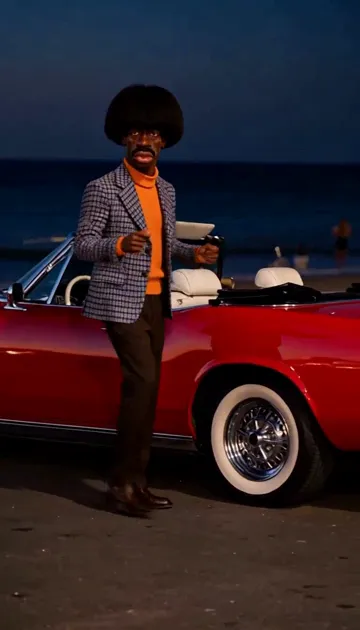
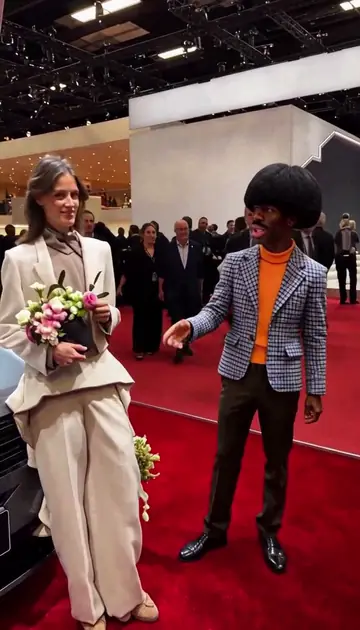
No clip of your own? Each trend is a short viral video with its shots and sound ready. Add one photo and you play the lead.




What people replace in videos
Put yourself in a scene
Take a dance, a sketch or a viral clip and become the person in it.
Swap an actor in a draft
Test a different presenter or extra in an ad or pre-visualization before booking anyone.
Two friends at once
Replace both people in a two-person clip with two photos, for a birthday or a joke.
Original characters
Describe a character in words, like a pirate captain or an elf, instead of using a photo.
What does it mean to replace a person in a video with AI?
Replacing a person in a video means the AI rebuilds one performer in every frame as someone else, while everything that happens in the clip stays. ActLike AI changes the whole person, not only the face: the face, hair, skin tone, build and clothes come from your photo, and the pose, gestures, timing, camera, background and sound come from the clip.
| Face swap app | ActLike AI person replacement |
|---|---|
| Pastes a new face onto the old head | Rebuilds the whole person from the photo |
| Old hair, body and clothes stay | Hair, build and outfit change too |
| Edges can flicker when the head turns | The new person follows every move |
For a step-by-step walkthrough with a recorded example, read the guide on how to replace a person in a video.
Can I replace a person with a character instead of a real photo?
Yes. Choose “Describe a character” in the studio and write how the character looks: an elderly sea captain, a vampire, a superhero in your own design. A described character adds 1 credit to the video. A dog or cat photo also works: the pet is redrawn as an upright character that plays the role. See the AI character video guide.
How do I replace two people in one video?
Open the Two-Person Swap studio, add one photo for each person and say who each replaces, for example “the woman on the left” and “the man in the blue shirt”. Both people change in one render at the same credit rate. Ready-made trends have one fixed role, so they take one photo. In Face Swap, a second photo is a second view of the SAME person, which sharpens the likeness.
Which photo of the new person works best?
- The person alone in the picture, face fully visible, in soft even light.
- Match the shot: a full-body photo for a clip that shows the whole body, head and shoulders for a close-up.
- The outfit in the photo is the outfit in the video.
- JPG or PNG under 10 MB; save iPhone HEIC photos as JPG first.
- Only photos of yourself or of adults who agreed; no public figures.
How much does it cost to replace a person in a video?
It is billed per second of the clip, rounded up: 1 credit per second at 480p, 2 at 720p, 3 at 1080p (clips up to 30 s). A second person costs nothing extra.
| Clip length | 480p | 720p | 1080p |
|---|---|---|---|
| 5 s | 480p: 5 credits | 720p: 10 credits | 1080p: 15 credits |
| 10 s | 480p: 10 credits | 720p: 20 credits | 1080p: 30 credits |
| 15 s | 480p: 15 credits | 720p: 30 credits | 1080p: 45 credits |
| 30 s | 480p: 30 credits | 720p: 60 credits | 1080p: 90 credits |
Credits come in one-time packs with no subscription, and a failed render gives its credits back. See every pack on the pricing page.
Want to replace something other than a person?
Use the matching studio: Car Swap for vehicles, Object Swap for items someone holds, Outfit Swap for clothes and Hair Swap for a new cut or colour. They all keep the motion and camera of your clip.
Face Swap or Car Swap: which studio do you need?
Both studios edit a real video instead of animating a still image, and both bill the same way: 1 credit per second at 480p, 2 at 720p and 3 at 1080p. The difference is what gets replaced.
| At a glance | Face Swap | Car Swap |
|---|---|---|
| What changes | The whole person: face, hair, build and outfit | The vehicle: body, paint, wheels and trim |
| What you add | One or two photos of the person (two people in Two-Person Swap), or a description | Two photos of the same car: front and side or rear three-quarter |
| What stays | Motion, timing, camera, background and original sound | The shot, camera movement and the rest of the scene |
| Ready-made clips | Trend clips such as Seaside Arrival and Gentleman Move | Christmas Car Delivery |
Guides and ideas
All guides →- TutorialsHow to Put My Face in a Video With AIStart with one face photo and a clip you may reuse. How to choose a shot that works, what the app replaces, and what to check before you share.Read the guide
- TutorialsHow to Face Swap a Video on iPhone (Whole Character)Prepare your clip and character, choose a quality, and understand the credit cost before generating on iPhone.Read the guide
- Quality and settingsFace Swap Video in High Quality: Inputs and 720p HD SettingsWhat 720p changes, what it cannot fix, and how to choose inputs that hold up when the head moves.Read the guide
- TutorialsHow to Replace a Person in a Video With AI: From Clip to Finished VideoEverything a first-time user needs: which clips work, which photos fail, what each setting costs, and how to fix a soft result.Read the guide
Questions about replacing a person in a video
How do I replace a person in a video with AI?
Open actlikeai.video/create, upload your clip or pick a trend, add one photo of the new person, say who should change and generate. ActLike AI rebuilds the person and keeps the moves, camera and sound. A 10-second clip costs 10 credits at 480p.
Does it replace only the face?
No. ActLike AI replaces the whole person: face, hair, build and clothes come from the photo, and the motion and sound come from the clip.
Can I replace two people in one video?
Yes, in your own clip: add a second photo and say who each person replaces. The credit rate stays the same.
Can I replace a person with a cartoon or fantasy character?
Yes. Choose Describe a character and write the look in words. A described character adds 1 credit.
How long does it take?
Most videos are ready in 2 to 6 minutes. Finished videos stay in My videos for about 90 days.
Whose photo can I use?
Your own, or that of an adult who agreed. Photos of public figures, minors in revealing content and anything sexual are not allowed, and the result must be shared as AI-generated.
Keep reading
Replace a person in a video with AI
One-time packs from 15 credits for $3.49 (US list price), no subscription. The studio shows the credit total before you sign in.
Open Face Swap studio



 Listed on Dang.ai