
Two-Person Swap studio
Multiple face swap video: two people, one render
Upload a clip with two people, add one photo for each new person and say who replaces whom. ActLike AI rebuilds both people in every frame, head to toe, while the moves, the moment between them, the camera and the sound stay.
One-time packs from 15 credits for $3.49 (US list price), no subscription. Two people cost the same as one.
At a glance
- You add
- Your own clip with two people, one photo per new person, and who each one replaces.
- How many people
- Two, the most the model can place in one render. Everyone else in the clip stays.
- What changes
- Both people, head to toe: face, hair, build and outfit from each photo.
- What stays
- Every move, hug, high five and glance between them, plus the camera, room and sound.
- Cost
- 1 credit per second at 480p, 2 at 720p, 3 at 1080p (clips up to 30 s). Two people cost the same as one; 5 s is 5 credits at 480p.
- Clip limits
- MP4 or MOV, up to 120 seconds and 250 MB.
Updated 22 November 2026 by ActLike AI. Prices and limits are the web studio’s current rules.
How to swap two people in a video
- 1
Upload the clip
Choose an MP4 or MOV of up to 120 seconds where both people are clearly visible.
- 2
Add two photos
Add a photo for the first person and say who they replace, then a photo for the second person and who they replace, e.g. “the man in the green hoodie on the left”.
- 3
Pick a quality and generate
Choose 480p, 720p or 1080p (clips up to 30 s), tick the consent box, sign in and generate. Both people change in one render.
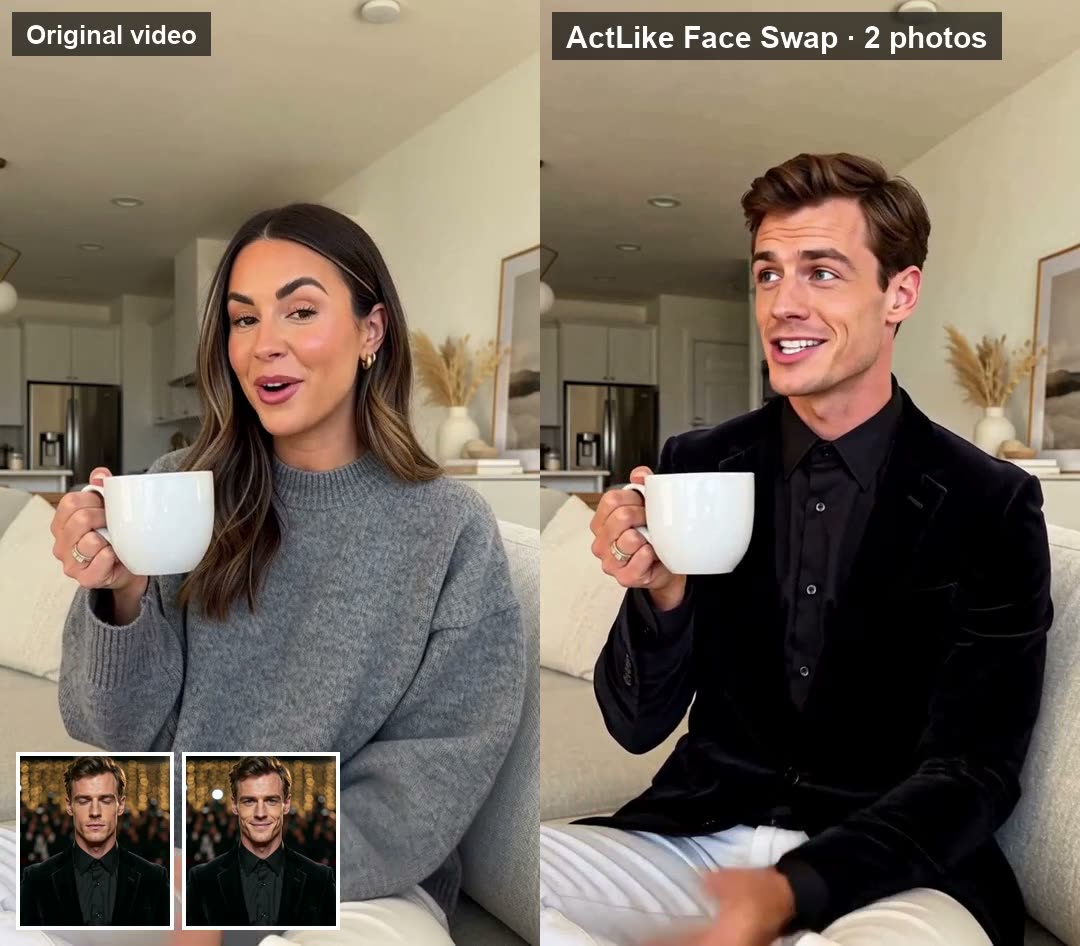
Only one person, but two photos?
Face Swap now takes a second photo of the same person for a closer likeness. Here both photos showed one man; the result has one new person.
What people make with two-person swaps
You and a friend in a scene
Put both of you into a dance, a sketch or a funny clip for a birthday or a group chat.
Couples and wedding videos
Star as a couple in a romantic or funny two-person scene, with both people’s consent.
Duo trends and skits
Remake a two-person meme with your own faces and post it labelled as AI.
Ad and sketch drafts
Test two presenters in a dialogue before casting anyone.
What is a multiple face swap video?
A multiple face swap video replaces more than one person in the same clip. ActLike AI replaces two people in one render: each is rebuilt from their own photo, head to toe, and the two keep interacting the way the original pair did. Two is the maximum because the video model takes two reference photos per render.
| From the photos | From the clip |
|---|---|
| Each person’s face, hair, build and outfit | Their moves, timing and how they interact |
| Which photo is which person (your two targets) | The camera, the room, the lighting and the sound |
What did the example change?
The source is a 5-second, AI-generated clip of two friends on a sofa: a young man in a green hoodie on the left and a young woman in a yellow t-shirt on the right, waving and then giving each other a high five. With one photo of a man in a black blazer and one of a woman in a cream shirt, both were replaced in one render. The wave, the high five, the sofa, the laptop and the mug stayed.
How do I say who replaces whom?
Each photo gets its own target. Point out the person as you would to a friend watching the clip: side, clothing and anything else that tells them apart.
- Photo 1: “the man in the green hoodie on the left”.
- Photo 2: “the woman in the yellow t-shirt on the right”.
- Avoid targets that could match both people, like “the person smiling”.
- Both people should be visible for most of the clip; someone who enters late is harder.
Which photos work best?
- One person per photo, alone, face fully visible, in even light.
- Match the shot: full-body photos for a clip that shows both people head to toe.
- The outfit in each photo is the outfit that person wears in the video.
- Only photos of people who agreed; no public figures; label the result as AI-generated.
How much does a two-person face swap cost?
The same as one person: per second of the clip, rounded up, 1 credit per second at 480p, 2 at 720p, 3 at 1080p (clips up to 30 s). If the model cannot place both people, the job fails and its credits come back; it never arrives with only one of them changed.
| Clip length | 480p | 720p | 1080p |
|---|---|---|---|
| 5 s | 480p: 5 credits | 720p: 10 credits | 1080p: 15 credits |
| 10 s | 480p: 10 credits | 720p: 20 credits | 1080p: 30 credits |
| 15 s | 480p: 15 credits | 720p: 30 credits | 1080p: 45 credits |
| 30 s | 480p: 30 credits | 720p: 60 credits | 1080p: 90 credits |
Can I swap more than two people?
Not in one render. For a group, render the clip with two people, then use that result as the clip for the next two. Each render is billed per second. Ready-made trends have one role, so they take one photo; use Face Swap or the trends for those.
Guides and ideas
All guides →- IdeasMake Yourself Dance AI: Star in a Real Dance Clip With One PhotoOne photo of you and one real dance clip: you dance the same steps, to the same music, in the same shot. Which clip and photo work, how to trim before you pay, and what it costs.Read the guide
- IdeasHow to Make Funny AI Videos of You, Your Friends or Your PetThe funniest AI videos are not written by a prompt. They start from a clip that is already funny and a photo of someone everyone knows. Ten ideas, the photo and clip that work, the free editor for captions, the cost and the rules.Read the guide
- IdeasBirthday AI Video: Star the Birthday Person in a Trend or Your Own ClipOne photo of the birthday person, a funny clip, and they are the star: the friend who insists on paying, the guest on the red carpet, the dog at the dinner table. Ideas, the right photo, the free editor for the birthday message, the cost and the rules.Read the guide
- PetsAI Video of My Dog: Make Your Dog Dance or Star in a TrendOne photo of your dog, and it walks into the bushes, plays the deadpan sushi chef or dances your own choreography. Which photo works, which clips take a pet, what it costs and what it cannot do yet.Read the guide
Two-person face swap questions
How do I face swap two people in a video?
Open actlikeai.video/create/two-person-swap, upload a clip with two people, add one photo for each new person, say who each replaces and generate. A 5-second clip costs 5 credits at 480p, the same as one person.
How many people can I swap at once?
Two per render, the most the model can place. For more, render again with the first result as the clip.
Does a second person cost more?
No. The price depends only on the clip length and quality.
What if only one person changes?
A two-person job that cannot place both people fails and its credits come back automatically; it is never delivered half done.
Can I use two photos of the same person?
Yes, in Face Swap: add a second photo of the same person for a closer likeness. Two-Person Swap is for two different people.
Keep reading
Multiple face swap video: two people, one render
One-time packs from 15 credits for $3.49 (US list price), no subscription. Two people cost the same as one.
Open Two-Person Swap studio



 Listed on Dang.ai